It all started because my screen recordings were too big. These 4k files were a pain to share and to receive. I was opening them up in Davinci Resolve just to export them at 1080p and maybe trim out some unnecessary bits.
I was also experimenting a bunch with Claude Code. I thought, if Claude can run terminal commands, and there is a way to manipulate video using terminal commands, maybe Claude could edit video?
Turns out, it can. If you want to skip the story and give it a go:
FFMPEG Allows Claude to Edit Video
FFMPEG did just that. After installing it, I was able to give Claude specific video editing commands like export "path/to/video.mp4" at 1080p. I was also able to tell it to do things like cut out 10:00 to 12.25 and it would give me just that.
Resolve
- Open Resolve
- Create / open project
- Import video
- Trim video
- Export video at 1080p
Claude Code
- Tell Claude Code: Export “path/to/video.mp4” at 1080p, start at 2:15
This solved my video resizing issue and was great for very simple edits, but it’s important to note that Claude can’t actually see into the video, it’s just applying my instructions. I have to open the video; look for the timestamps I want to cut at and tell Claude each timestamp. Beyond 1 or 2 cuts, it made more sense to just open it in Resolve. But what if Claude had access to the video’s transcript with timestamps?
Whisper Tells Claude What’s in the Video
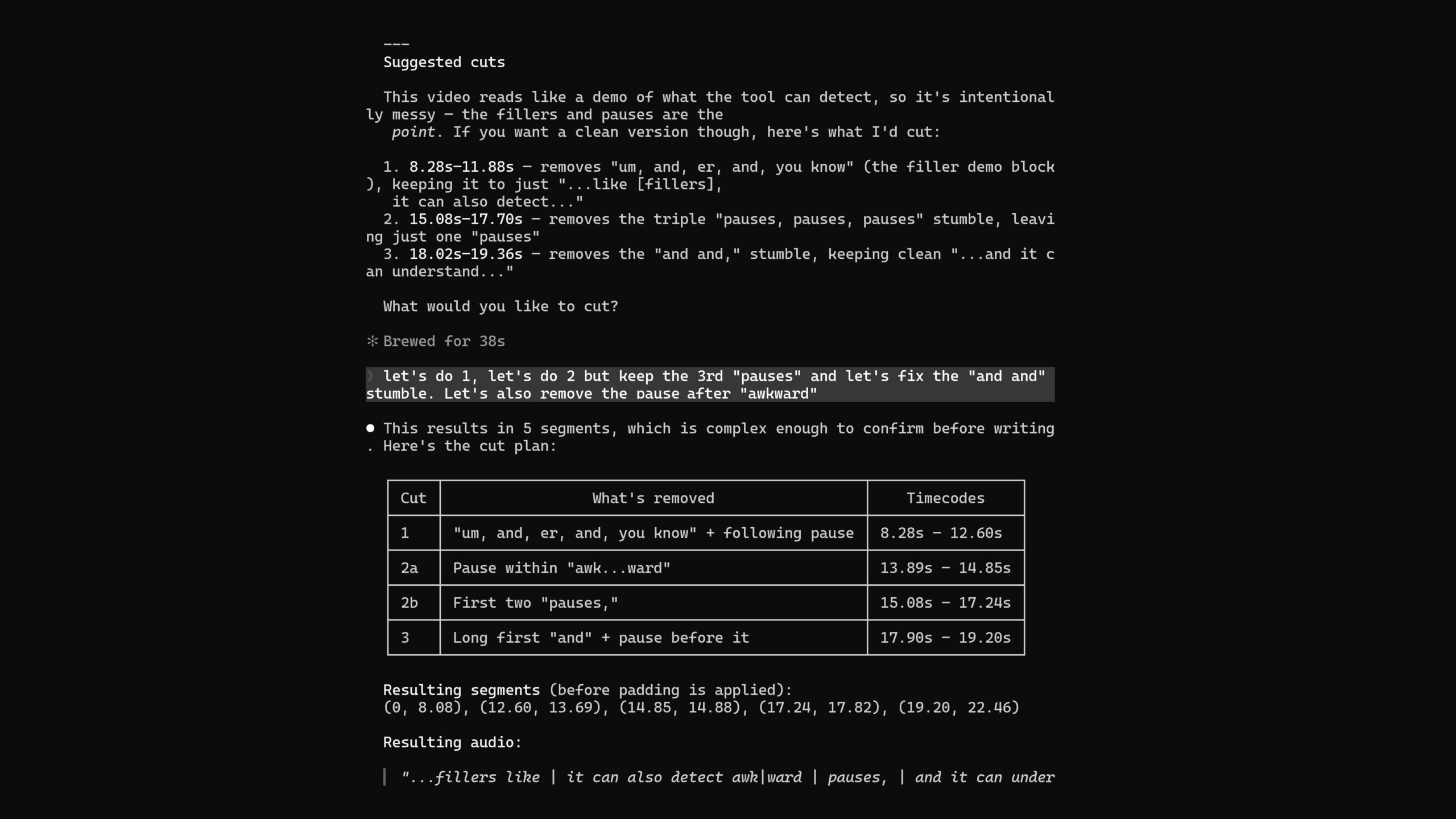
Whisper is an AI transcription tool. Using Claude, I vibe-coded a python file that analyzes the video. It outputs a plain text transcript, as well as an analysis file where every word is accompanied with a timestamp. To create the analysis file, I updated the initial prompt to detect filler words like “um” and “you know”. I combined it with an FFMPEG function that detects pauses in the video. Upon completing the analysis, Claude Code summarizes its findings and presents suggested cuts with timecodes and a brief reason for each.
Transcript
I just turned Claude Code into my own video editing collaborator. It can detect word fillers like um, and, er, and, you know, it can also detect awkward pauses, pauses, pauses, and and, it can understand what I’m saying and help me make editing decisions.
Analysis
[1.80s – 2.48s] I
[2.48s – 2.62s] just
[2.62s – 2.80s] turned
[2.80s – 3.04s] Claude
[3.04s – 3.34s] Code
[3.34s – 3.58s] into
[3.58s – 3.80s] my
[3.80s – 4.08s] own
[4.08s – 4.36s] video
[4.36s – 4.76s] editing
[4.76s – 5.66s] collaborator.
*** PAUSE (0.50s) [5.58s – 6.08s] ***
Claude Code Summary
Plain transcript:
I just turned Claude Code into my own video editing collaborator. It can detect word fillers like um, and, er, and, you know, it can also detect awkward pauses, pauses, pauses, and and, it can understand what I’m saying and help me make editing decisions.
Flagged items
Long words
awkward — 13.84s–15.08s (1.24s)
and — 18.02s–19.20s (1.18s)
Pauses
0.50s pause at 5.58s–6.08s
0.76s pause at 11.92s–12.68s
0.96s pause at 13.89s–14.85s (overlaps with “awkward”)
0.63s pause at 15.87s–16.51s
0.84s pause at 17.90s–18.74s
Filler words
um, — 8.28s–8.94s
and, — 9.52s–10.12s (also struck in .md)
er, — 10.34s–10.56s (also struck in .md)
and, — 11.16s–11.50s (also struck in .md)
you know, — 11.66s–11.88s (also struck in .md)
Stumbles
“pauses, pauses, pauses” — 15.08s, 16.14s, 17.24s — repeated word, likely a false start
“and and,” — 18.02s–19.36s — doubled word
Suggested cuts
“pauses, pauses” (first two instances, 15.08s–17.24s) — stumble, keep only the final pauses, at 17.24s
“and and,” (18.02s–19.36s) — doubled word, keep only “it” onward at 19.36s
Pause at 5.58s–6.08s — 0.5s dead air between “collaborator” and “It” — optional tighten
The AI Video Editor
Now I can edit the video just by text editing the transcript, like in Descript! I can remove all the “um’s” and “you knows,” get rid of all the pauses, and consult Claude about editing decisions. It then compiles all the edits into a text file that acts as both documentation and instructions for editing the video with FFMPEG. It exports the video at any scale and crop I want.
If the result isn’t perfect, no problem, the process can happen as many times as necessary. When there are changes, Claude makes a new folder with an incremented version number, containing a new text file and exported video.

Every version creates a new folder, text file, export and EDL file
I just turned Claude Code into my own video editing collaborator. It can detect word fillers like um, and, er, and, you know, it can also detect awkward pauses, pauses, pauses, and and, it can understand what I’m saying and help me make editing decisions.
Use strikethroughs to tell Claude what to cut
Compatible with DaVinci Resolve and Other Video Editors (Probably)
Anyone who has video edited before knows that it’s not that simple. Videos that are edited from the transcript can feel choppy and awkward. Sometimes you just need to do it yourself. The only way to look high effort is to put in high amounts of effort.
In addition to editing the video, Claude translates those instructions into an EDL (Edit Decision List) file that Resolve can read. I can put the original video in the media bin, import the EDL, and I’ll have a pre-cut timeline ready to go. This is totally non-destructive, and I can continue editing the video like I would in any other Resolve project.

Try it Yourself
Don’t just take my word for it, give it a go and let me know what you think!
